Introduction
VTP stands for VLAN Trunking Protocol. Cisco switches use it to share VLAN information over trunk links. A single change can update the VLAN database on many switches.
A VLAN deletion can spread just as quickly as an addition. This lab shows which changes are shared and what happens when a switch joins with a higher revision number.
VTP modes
The lab covers three modes: Server, Client, and Transparent. A server can change the shared VLAN database. A client learns that database. A transparent switch keeps its own VLANs.
VTP messages travel over trunks. A VLAN appearing in the database is separate from assigning access ports or allowing that VLAN on a trunk.
Lab topology
SW1 is the server, SW2 is the client, and SW3 runs in Transparent mode. The links between them are trunks.
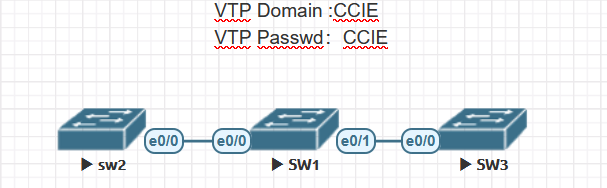
SW1 as the server
SW1 is already in Server mode. Set the domain and lab password to CCIE. Verify the settings with show vtp status and show vtp password.
Switch(config)#vtp domain CCIE
Changing VTP domain name from NULL to CCIE
*Jan  7 08:06:16.358: %SW_VLAN-6-VTP_DOMAIN_NAME_CHG: VTP domain name changed to CCIE.
Switch(config)#vtp password CCIE
Setting device VTP password to CCIE
Switch(config)#end
Switch#show vtp stat
*Jan  7 08:06:28.596: %SYS-5-CONFIG_I: Configured from console by console
Switch#show vtp status
VTP Version capable             : 1 to 3
VTP version running             : 1
VTP Domain Name                 : CCIE
VTP Pruning Mode                : Disabled
VTP Traps Generation            : Disabled
Device ID                       : aabb.cc80.0700
Configuration last modified by 0.0.0.0 at 1-6-21 07:22:30
Local updater ID is 0.0.0.0 (no valid interface found)

Feature VLAN:
--------------
VTP Operating Mode                : Server
Maximum VLANs supported locally   : 1005
Number of existing VLANs          : 7
Configuration Revision            : 2
MD5 digest                        : 0x14 0x9E 0xBC 0xC0 0x07 0x18 0xAF 0x80
                                    0x4D 0x83 0x44 0x10 0xB2 0x97 0xED 0xB4
Switch#show vtp password
VTP Password: CCIE
Switch#
SW2 as the client
Set the same domain and password on SW2, then change its mode to Client.
SW2(config)#vtp domain CCIE
Domain name already set to CCIE.
SW2(config)#vtp password CCIE
Setting device VTP password to CCIE
SW2(config)#vtp mode client
Setting device to VTP Client mode for VLANS.
SW2(config)#do show vtp status
VTP Version capable             : 1 to 3
VTP version running             : 1
VTP Domain Name                 : CCIE
VTP Pruning Mode                : Disabled
VTP Traps Generation            : Disabled
Device ID                       : aabb.cc80.0100
Configuration last modified by 0.0.0.0 at 1-6-21 07:22:30

Feature VLAN:
--------------
VTP Operating Mode                : Client
Maximum VLANs supported locally   : 1005
Number of existing VLANs          : 7
Configuration Revision            : 2
MD5 digest                        : 0x14 0x9E 0xBC 0xC0 0x07 0x18 0xAF 0x80
                                    0x4D 0x83 0x44 0x10 0xB2 0x97 0xED 0xB4
SW3 in Transparent mode
Set the same domain and password on SW3, then change its mode to Transparent. Its VLAN count and revision differ from the values on SW1 and SW2.
SW3(config)#vtp domain CCIE
Changing VTP domain name from NULL to CCIE
*Jan  7 08:22:43.410: %SW_VLAN-6-VTP_DOMAIN_NAME_CHG: VTP domain name changed to CCIE.
SW3(config)#vtp password CCIE
Setting device VTP password to CCIE
SW3(config)#vtp mode transparent
Setting device to VTP Transparent mode for VLANS.
SW3(config)#do show vtp status
VTP Version capable             : 1 to 3
VTP version running             : 1
VTP Domain Name                 : CCIE
VTP Pruning Mode                : Disabled
VTP Traps Generation            : Disabled
Device ID                       : aabb.cc80.0200
Configuration last modified by 0.0.0.0 at 0-0-00 00:00:00

Feature VLAN:
--------------
VTP Operating Mode                : Transparent
Maximum VLANs supported locally   : 1005
Number of existing VLANs          : 5
Configuration Revision            : 0
MD5 digest                        : 0x0C 0xF3 0x3A 0x7E 0x13 0x5B 0x17 0x29
                                    0xEB 0xB1 0x2A 0x4C 0x9D 0x50 0x63 0xF9
Read the VTP status
| Field | Meaning |
|---|---|
| Version capable / version running | This switch supports versions 1 through 3. The lab is running version 1. |
| Domain Name | Switches need to be in the same VTP domain to share their VLAN database. If a password is set, it must match too. |
| Pruning Mode | Whether VTP pruning is enabled. |
| Operating Mode | The role the switch is using. |
| Maximum VLANs supported locally | This switch reports a local limit of 1005 in the output above. |
| Number of existing VLANs | How many VLANs are present now, including the defaults. |
| Configuration Revision | The number VTP v1 and v2 use to tell which copy of the database is newer. |
Check VLAN synchronization
Create VLANs 10, 20, 30, and 1006 on SW1.
SW1(config)#vlan 10,20,30,1006
SW1(config-vlan)#vlan 10
SW1(config-vlan)#name blue
SW1(config-vlan)#vlan 20
SW1(config-vlan)#name red
SW1(config-vlan)#vlan 30
SW1(config-vlan)#name green
SW1(config-vlan)#vlan 1006
SW1(config-vlan)#name black
SW1(config-vlan)#exit
SW1(config)#do show vlan brief

VLAN Name                             Status    Ports
---- -------------------------------- --------- -------------------------------
1    default                          active    Et0/2, Et0/3
10   blue                             active    Et1/0, Et1/1
20   red                              active    Et1/2, Et1/3
30   green                            active
1002 fddi-default                     act/unsup
1003 token-ring-default               act/unsup
1004 fddinet-default                  act/unsup
1005 trnet-default                    act/unsup
1006 black                            active
SW1(config)#
Run show vlan brief on SW2 to check which VLANs it learned.
SW2#show vlan brief

VLAN Name                             Status    Ports
---- -------------------------------- --------- -------------------------------
1    default                          active    Et0/1, Et0/2, Et0/3
10   blue                             active
20   red                              active
30   green                            active
1002 fddi-default                     act/unsup
1003 token-ring-default               act/unsup
1004 fddinet-default                  act/unsup
1005 trnet-default                    act/unsup
SW2#
VLANs 10, 20, and 30 appear on SW2. VLAN 1006 is in the extended range, which VTP v1 and v2 do not advertise. SW3 keeps its local database.
SW3(config)#do show vlan brief

VLAN Name                             Status    Ports
---- -------------------------------- --------- -------------------------------
1    default                          active    Et0/1, Et0/2, Et0/3
1002 fddi-default                     act/unsup
1003 token-ring-default               act/unsup
1004 fddinet-default                  act/unsup
1005 trnet-default                    act/unsup
SW3(config)#
SW3(config)#
Try a local change on SW2 and SW3
Try to create VLAN 40 on SW2. Client mode rejects the command.
SW2(config)#vlan 40
VTP VLAN configuration not allowed when device is in CLIENT mode.
SW2(config)#
The same change works on SW3. VLAN 40 stays on SW3 because Transparent mode does not advertise its local VLAN changes.
SW3(config)#vlan 40
SW3(config-vlan)#do wr
SW3(config-vlan)#name prue
SW3(config-vlan)#end
SW3#show vlan brief

VLAN Name                             Status    Ports
---- -------------------------------- --------- -------------------------------
1    default                          active    Et0/1, Et0/2, Et0/3
40   prue                             active
1002 fddi-default                     act/unsup
1003 token-ring-default               act/unsup
1004 fddinet-default                  act/unsup
1005 trnet-default                    act/unsup
The saved output below is from SW1. VLAN 40 is absent.
SW1(config)#do show vlan br

VLAN Name                             Status    Ports
---- -------------------------------- --------- -------------------------------
1    default                          active    Et0/2, Et0/3
10   blue                             active    Et1/0, Et1/1
20   red                              active    Et1/2, Et1/3
30   green                            active
1002 fddi-default                     act/unsup
1003 token-ring-default               act/unsup
1004 fddinet-default                  act/unsup
1005 trnet-default                    act/unsup
1006 black
What each mode does
- Server: In v1 and v2, Server mode allows local VLAN changes. A server can also learn updates from the domain.
- Client: A client can send and receive VTP messages. Its VLAN database cannot be edited locally.
- Transparent: Local VLAN changes are allowed. The switch keeps its own database and can pass received advertisements along a trunk, depending on the version and platform.
VTP versions
The lab switches support versions 1 through 3 and start in v1. Use show vtp status to check the running version. Defaults and supported features vary by platform.
What changes between versions
V2 adds Token Ring support and can pass along some fields it does not understand. It also changes how Transparent mode relays messages. Check the behavior on your switch before relying on it across different versions.
V3 can advertise extended-range VLANs and share the MST database as a separate feature. The primary server controls changes to the VLAN database. See the Cisco VTP configuration guide for platform details.
VTP versions 1 and 2
Run vtp version 2 to switch the lab to v2. SW1 shows revision 5.
SW1(config)#vtp version 2
SW1(config)#do show vtp status
VTP Version capable             : 1 to 3
VTP version running             : 2
VTP Domain Name                 : CCIE
VTP Pruning Mode                : Disabled
VTP Traps Generation            : Disabled
Device ID                       : aabb.cc80.0700
Configuration last modified by 0.0.0.0 at 1-7-21 09:15:58
Local updater ID is 0.0.0.0 (no valid interface found)

Feature VLAN:
--------------
VTP Operating Mode                : Server
Maximum VLANs supported locally   : 1005
Number of existing VLANs          : 8
Configuration Revision            : 5
MD5 digest                        : 0x27 0x65 0xD7 0x62 0x5B 0x80 0x92 0x18
                                    0x2D 0xA8 0x60 0xE8 0x76 0xDF 0x69 0x6D
The trap with v1 and v2 is that Server mode alone does not make SW1’s database the one everyone trusts. A switch in the same domain can bring in a higher revision. If the update is accepted, it can replace the existing VLAN database. Erasing the startup configuration alone may leave VLAN database information behind.
Reproduce a revision overwrite
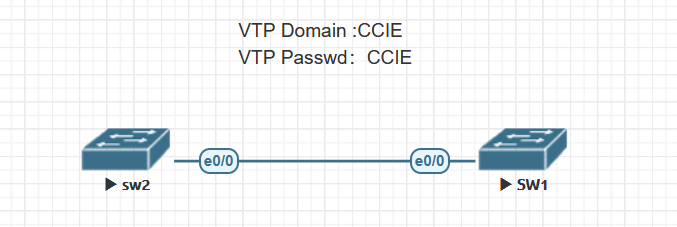
Shut down the trunk to isolate SW2. Put SW2 in Server mode, then create and delete VLAN 44. Its revision reaches 7.
SW2(config)#vtp mo server
Setting device to VTP Server mode for VLANS.
SW2(config)#vlan 44
SW2(config-vlan)#exit
SW2(config)#no vlan 44
SW2(config)#
SW2(config)#
SW2(config)#do show vtp status
VTP Version capable             : 1 to 3
VTP version running             : 2
VTP Domain Name                 : CCIE
VTP Pruning Mode                : Disabled
VTP Traps Generation            : Disabled
Device ID                       : aabb.cc80.0100
Configuration last modified by 0.0.0.0 at 1-7-21 09:22:12
Local updater ID is 0.0.0.0 (no valid interface found)

Feature VLAN:
--------------
VTP Operating Mode                : Server
Maximum VLANs supported locally   : 1005
Number of existing VLANs          : 8
Configuration Revision            : 7
MD5 digest                        : 0x3F 0xE4 0xFB 0x69 0x90 0x09 0x0F 0xAC
                                    0xA2 0x5E 0xA8 0xFC 0x5A 0x72 0xE8 0x36
SW2(config)#no vlan 10,20,30
SW2(config)#
SW2(config)#do show vlan brief
Delete VLANs 10, 20, and 30. SW2 now shows revision 8.
SW2(config)#no vlan 10,20,30
SW2(config)#
SW2(config)#do show vlan brief

VLAN Name                             Status    Ports
---- -------------------------------- --------- -------------------------------
1    default                          active    Et0/0, Et0/1, Et0/2, Et0/3
1002 fddi-default                     act/unsup
1003 trcrf-default                    act/unsup
1004 fddinet-default                  act/unsup
1005 trbrf-default                    act/unsup

SW2(config)#do show vtp status
VTP Version capable             : 1 to 3
VTP version running             : 2
VTP Domain Name                 : CCIE
VTP Pruning Mode                : Disabled
VTP Traps Generation            : Disabled
Device ID                       : aabb.cc80.0100
Configuration last modified by 0.0.0.0 at 1-7-21 09:22:29
Local updater ID is 0.0.0.0 (no valid interface found)

Feature VLAN:
--------------
VTP Operating Mode                : Server
Maximum VLANs supported locally   : 1005
Number of existing VLANs          : 5
Configuration Revision            : 8
MD5 digest                        : 0xC1 0x6D 0x2C 0x75 0x47 0xE9 0xA2 0x0A
                                    0xD9 0xF8 0xC9 0x5D 0x3A 0xDA 0x64 0x1B
SW1 still shows revision 5 while the link is down.
SW1(config)#do show vtp status
VTP Version capable             : 1 to 3
VTP version running             : 2
VTP Domain Name                 : CCIE
VTP Pruning Mode                : Disabled
VTP Traps Generation            : Disabled
Device ID                       : aabb.cc80.0700
Configuration last modified by 0.0.0.0 at 1-7-21 09:15:58
Local updater ID is 0.0.0.0 (no valid interface found)

Feature VLAN:
--------------
VTP Operating Mode                : Server
Maximum VLANs supported locally   : 1005
Number of existing VLANs          : 8
Configuration Revision            : 5
MD5 digest                        : 0x27 0x65 0xD7 0x62 0x5B 0x80 0x92 0x18
                                    0x2D 0xA8 0x60 0xE8 0x76 0xDF 0x69 0x6D
Bring the trunk back and check SW1
Switch SW2 back to Client mode and bring up the trunk.
SW2(config)#vtp mode client
Setting device to VTP Client mode for VLANS.
SW2(config)#inter e0/0
SW2(config-if)#no shu
SW2(config-if)#
SW2(config-if)#
SW2(config-if)#
*Jan  7 09:24:27.270: %LINK-3-UPDOWN: Interface Ethernet0/0, changed state to up
*Jan  7 09:24:28.271: %LINEPROTO-5-UPDOWN: Line protocol on Interface Ethernet0/0, cha
nged state to up
SW2(config-if)#
SW1 accepts revision 8. The output shows VLANs 10, 20, and 30 are gone, while the local extended-range VLAN 1006 is still there. In a live network, removing those VLANs can cut off traffic.
SW1(config)#do show vtp status
VTP Version capable             : 1 to 3
VTP version running             : 2
VTP Domain Name                 : CCIE
VTP Pruning Mode                : Disabled
VTP Traps Generation            : Disabled
Device ID                       : aabb.cc80.0700
Configuration last modified by 0.0.0.0 at 1-7-21 09:22:29
Local updater ID is 0.0.0.0 (no valid interface found)

Feature VLAN:
--------------
VTP Operating Mode                : Server
Maximum VLANs supported locally   : 1005
Number of existing VLANs          : 5
Configuration Revision            : 8
MD5 digest                        : 0xC1 0x6D 0x2C 0x75 0x47 0xE9 0xA2 0x0A
                                    0xD9 0xF8 0xC9 0x5D 0x3A 0xDA 0x64 0x1B
SW1(config)#do show vlan brief

VLAN Name                             Status    Ports
---- -------------------------------- --------- -------------------------------
1    default                          active    Et0/2, Et0/3
1002 fddi-default                     act/unsup
1003 trcrf-default                    act/unsup
1004 fddinet-default                  act/unsup
1005 trbrf-default                    act/unsup
1006 black                            active
SW1(config)#
Check that the revision resets
On this lab switch, switching SW2 to Transparent mode resets the revision to 0.
SW2(config)#vtp mode transparent
Setting device to VTP Transparent mode for VLANS.
SW2(config)#do show vtp status
VTP Version capable             : 1 to 3
VTP version running             : 2
VTP Domain Name                 : CCIE
VTP Pruning Mode                : Disabled
VTP Traps Generation            : Disabled
Device ID                       : aabb.cc80.0100
Configuration last modified by 0.0.0.0 at 1-7-21 09:22:29

Feature VLAN:
--------------
VTP Operating Mode                : Transparent
Maximum VLANs supported locally   : 1005
Number of existing VLANs          : 5
Configuration Revision            : 0
MD5 digest                        : 0xC1 0x6D 0x2C 0x75 0x47 0xE9 0xA2 0x0A
                                    0xD9 0xF8 0xC9 0x5D 0x3A 0xDA 0x64 0x1B
Before connecting a reused switch to a v1 or v2 domain, check its VLAN database and revision while the switch is isolated. Verify that the revision has reset before bringing up the trunk.
VTP version 3
The v3 test uses the same topology.
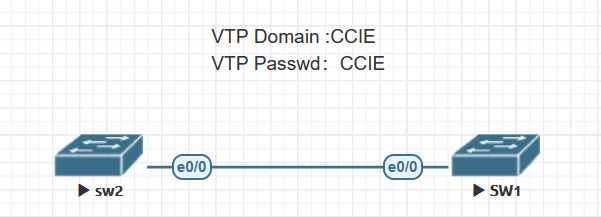
SW1(config)#vtp version 3
SW1(config)#
*Jan  7 09:53:52.977: %SW_VLAN-6-OLD_CONFIG_FILE_READ: Old version 2 VLAN configuration f
ile detected and read OK.  Version 3
    files will be written in the future.
The status now shows separate entries for VLAN and MST. SW1 is a VLAN server, but the Primary ID is still all zeros.
SW1(config)#do show vtp status
VTP Version capable             : 1 to 3
VTP version running             : 3
VTP Domain Name                 : CCIE
VTP Pruning Mode                : Disabled
VTP Traps Generation            : Disabled
Device ID                       : aabb.cc80.0700

Feature VLAN:
--------------
VTP Operating Mode                : Server
Number of existing VLANs          : 5
Number of existing extended VLANs : 1
Maximum VLANs supported locally   : 4096
Configuration Revision            : 0
Primary ID                        : 0000.0000.0000
Primary Description               :
MD5 digest                        :


Feature MST:
--------------
VTP Operating Mode                : Transparent


Feature UNKNOWN:
--------------
VTP Operating Mode                : Transparent
Set the password
With the hidden option, the saved output shows a key instead of the plain lab password. This option hides the stored password. It does not encrypt traffic on the trunk.
SW1(config)#VTP password CCIE HIdden
Setting device VTP password
SW1(config)#DO SHOW VTP PASSWORD
VTP Password: 621F5C1360325D70E1B404F1D48E270F
SW1(config)#
Make SW1 the VLAN primary server
SW1 is in Server mode but has yet to take the primary role. The switch rejects the attempt to create VLAN 10.
SW1(config)#vlan 10
VTP VLAN configuration not allowed when device is not the primary server for vlan databas
e.
SW1(config)#
From the privileged EXEC prompt, run vtp primary vlan, enter the VTP password, and confirm the takeover. SW1 can now update the domain’s VLAN database.
SW1#vtp primary vlan
This system is becoming primary server for feature vlan
Enter VTP Password:
No conflicting VTP3 devices found.
Do you want to continue? [confirm]
SW1#
*Jan  7 10:04:38.714: %SW_VLAN-4-VTP_PRIMARY_SERVER_CHG: aabb.cc80.0700 has become the pr
imary server for the VLAN VTP feature
VTP pruning
An allowed VLAN list tells the switch which VLANs may use a trunk. VTP pruning works within that list. It saves bandwidth by keeping unnecessary flooded traffic off links where it is not needed.
Consider an office using VLAN 10 and an industrial building using VLAN 20. Both switches may know about both VLANs. Pruning can keep VLAN 10 broadcasts off the trunk to the industrial building when that branch does not need them.
Pruning lab topology
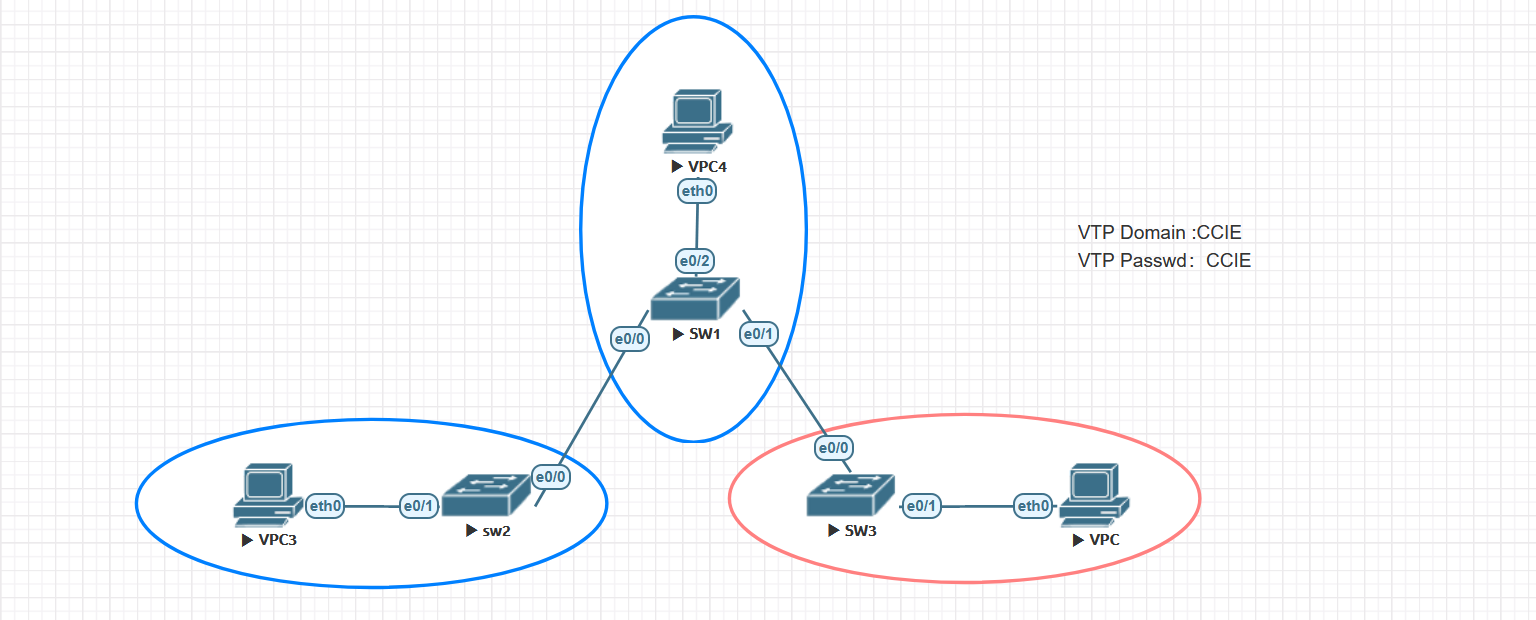
The office uses VLAN 10, the industrial building uses VLAN 20, and the trunks allow all VLANs.
Follow ARP with pruning disabled
VPC4 sends a VLAN 10 ARP request. With pruning off, SW3 gets a copy even though it has no VLAN 10 hosts.
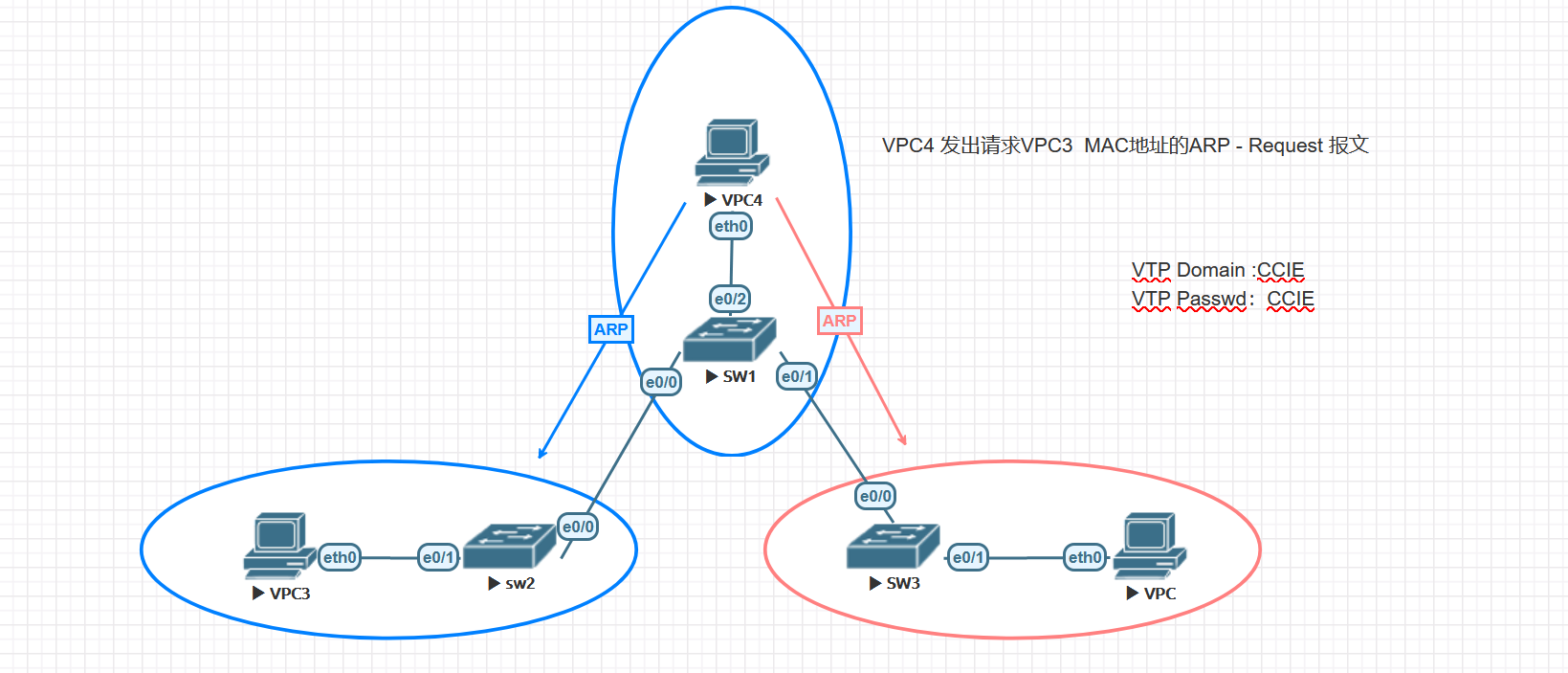
With pruning enabled, switches use VTP Join messages to signal which eligible VLANs need flooded traffic on a trunk. VLAN 1 is not eligible for pruning.
Enable pruning
For this v2 test, enable vtp pruning on the server. In v1 and v2 it is a domain setting for participating switches. V3 requires enabling it on each device. The saved status shows SW1 enabled and SW2 in Transparent mode with pruning disabled. The port output below shows the result on each trunk.
SW1(config)#do show vtp status
VTP Version capable             : 1 to 3
VTP version running             : 2
VTP Domain Name                 : CCIE
VTP Pruning Mode                : Enabled
VTP Traps Generation            : Disabled
Device ID                       : aabb.cc80.0700
Configuration last modified by 1.1.1.1 at 1-14-21 09:18:57
Local updater ID is 1.1.1.1 on interface Vl1 (lowest numbered VLAN interface found)

Feature VLAN:
--------------
VTP Operating Mode                : Server
Maximum VLANs supported locally   : 1005
Number of existing VLANs          : 8
Configuration Revision            : 5
MD5 digest                        : 0x79 0xB5 0x24 0x51 0x54 0xBD 0x14 0xB9
                                    0xA3 0xAE 0xCF 0x80 0x7F 0x2A 0x5D 0xE8


SW2(config)#do show vtp status
VTP Version capable             : 1 to 3
VTP version running             : 2
VTP Domain Name                 : CCIE
VTP Pruning Mode                : Disabled
VTP Traps Generation            : Disabled
Device ID                       : aabb.cc80.0100
Configuration last modified by 1.1.1.1 at 1-14-21 09:18:07

Feature VLAN:
--------------
VTP Operating Mode                : Transparent
Maximum VLANs supported locally   : 1005
Number of existing VLANs          : 8
Configuration Revision            : 0
MD5 digest                        : 0xB4 0xFD 0xF7 0x39 0x3B 0xE6 0x94 0xFF
                                    0xE9 0x07 0xA7 0xC7 0x7C 0x10 0xBB 0x43
Check the trunk and pruning status
Run show interfaces pruning to check each link. The output shows two directions: which VLANs the neighbor did not request, and which VLANs the local switch requested from the neighbor.
SW1#show inter pruning

Port                Vlans pruned for lack of request by neighbor
Et0/0               10,30
Et0/1               20,30

Port                Vlan traffic requested of neighbor
Et0/0               1,10
Et0/1               1,20
show interfaces trunk also shows the difference. SW2’s allowed list is still 1–4094, but the final list shows only VLANs 1 and 20 forwarding and not pruned at the time of the capture.
SW2(config-if)#do show inter pru

Port                Vlans pruned for lack of request by neighbor
Et0/0               10,20,30

Port                Vlan traffic requested of neighbor
Et0/0               1,10
SW2#show inter trunk

Port        Mode             Encapsulation  Status        Native vlan
Et0/0       on               802.1q         trunking      1

Port        Vlans allowed on trunk
Et0/0       1-4094

Port        Vlans allowed and active in management domain
Et0/0       1,10,20,30

Port        Vlans in spanning tree forwarding state and not pruned
Et0/0       1,20


SW3(config-if)#DO SHOW INTER PRU

Port                Vlans pruned for lack of request by neighbor
Et0/0               10,30

Port                Vlan traffic requested of neighbor
Et0/0               1,20
Production considerations
VTP can distribute additions and deletions across the domain. With v1 or v2, verify the revision and VLAN database on any reused switch before connecting it to a production trunk.
Managing VLANs locally requires more configuration, but it keeps the scope of each change explicit. Where VTP is required, define which switch can change the shared database and verify the result on the affected trunks.
