Introduction
Two tables are useful when troubleshooting IPv4 over Ethernet. The ARP table maps a next-hop IP address to a MAC address. The switch’s MAC table maps a MAC address to a port in a VLAN.
What ARP does
The host checks its route first. For an on-link destination, it resolves the destination host’s MAC address. For a remote destination, it resolves the next-hop router’s MAC address. The IP destination still identifies the final endpoint. The Ethernet destination identifies this hop.
IPv6 uses Neighbor Discovery for this job. RFC 826 · RFC 4861
How ARP works
R1 and R3 share a subnet. If R1 has no mapping for R3, it broadcasts an ARP Request on the local link. R3 recognizes its IP address and normally sends a unicast ARP Reply. R1 can then send the ICMP packet.
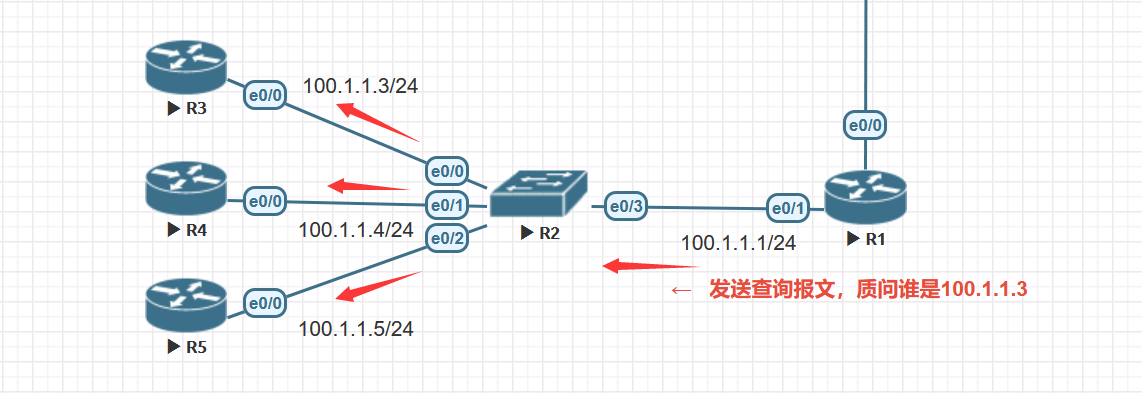
The request uses ff:ff:ff:ff:ff:ff as the Ethernet destination. Inside the ARP message, the target hardware address is still unknown and is usually all zeros. The old diagram labels R3’s response as a Request. It represents a Reply.
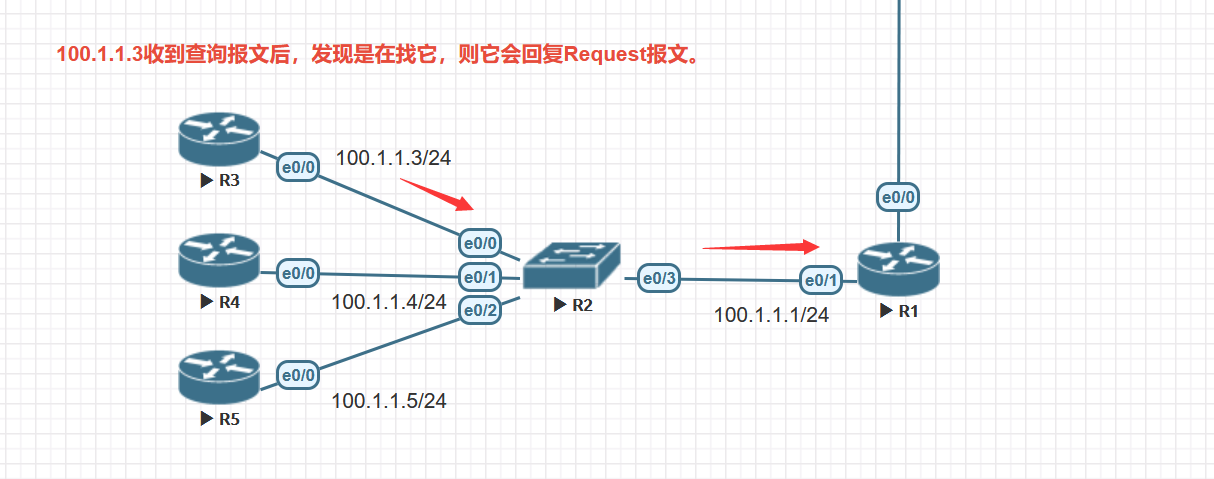
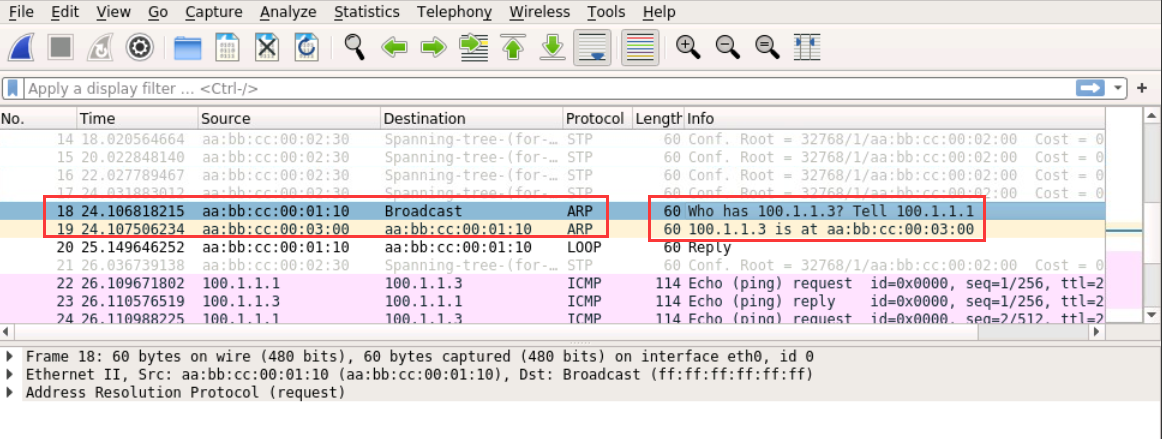
Packet 18 asks for the MAC address of 100.1.1.3. In packet 19, R3 replies to R1. The ICMP exchange follows. A later ping can reuse the cached mapping.
The ARP table
Use show arp or show ip arp on the Cisco device. A Layer 2 switch forwards by its MAC table. A switch with a management IP or routed interface can also maintain ARP entries for its own IPv4 communication.

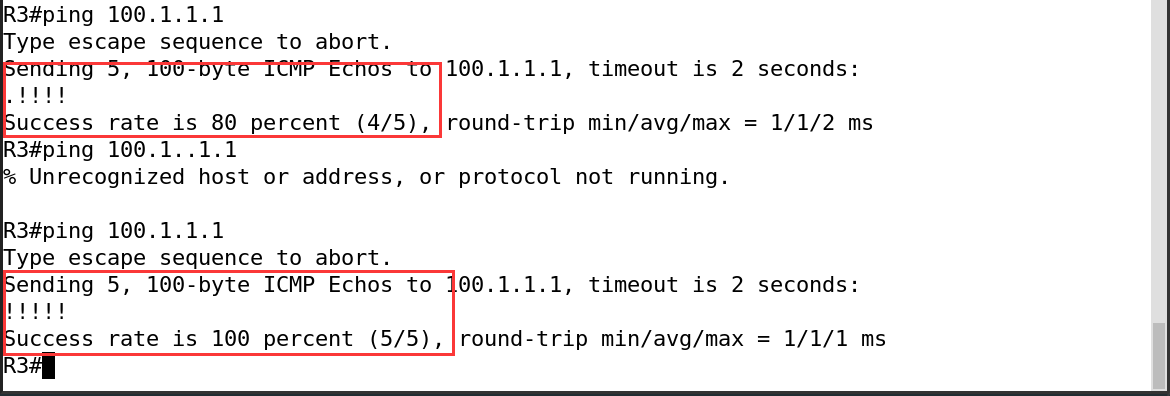
Dynamic entries age out under platform-specific rules. Devices can also learn the sender’s mapping from received ARP messages, depending on the implementation. In the lab, the first ping showed a timeout while resolution was pending. The second could use the existing entry.
Other uses of ARP
Proxy ARP
A router can reply to an ARP Request on behalf of another IP address. If Proxy ARP is enabled and R3 can route to the target through another interface, R3 can answer with the MAC address on the requester’s side. The frame goes to R3 while the IP packet keeps its original destination. RFC 1027
Without a default gateway
The Cisco device acting as a PC directly queries remote addresses 100.1.1.1 and 100.1.1.2. R3 replies on Ethernet0/1. Some hosts would report an unreachable destination without a route instead of sending those requests.
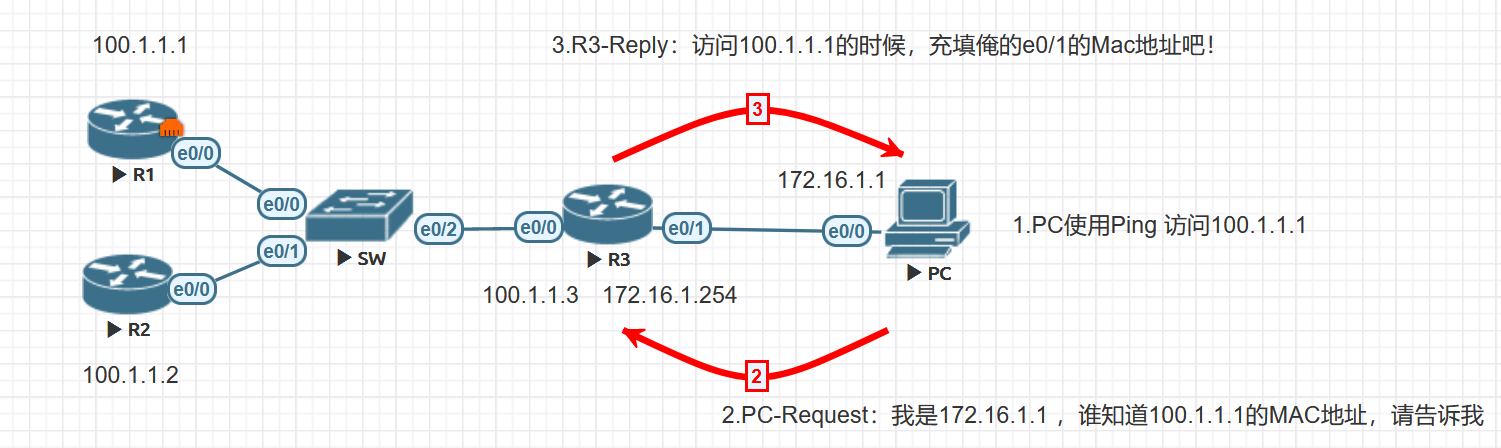
Ping R1 and R2.
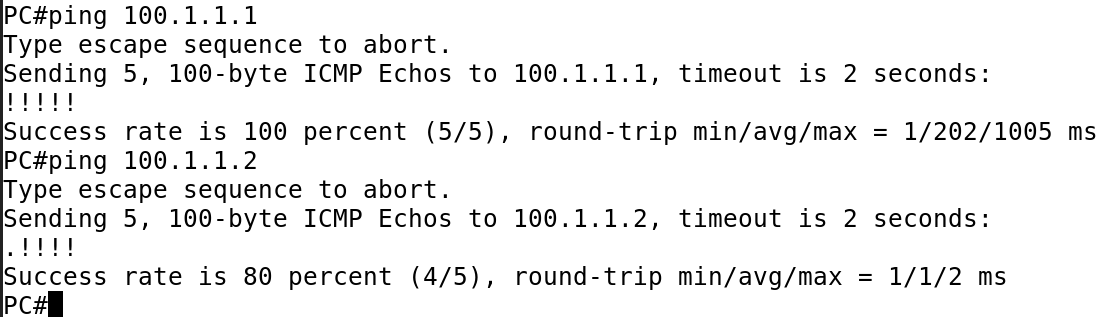
R3’s Ethernet0/1 MAC address is aabb.cc00.0510.

The capture and ARP table show the same MAC address for both IPs.


Entries can return after a cache clear if new traffic triggers resolution. Capture before and after clearing the table to identify the trigger.
With a default gateway
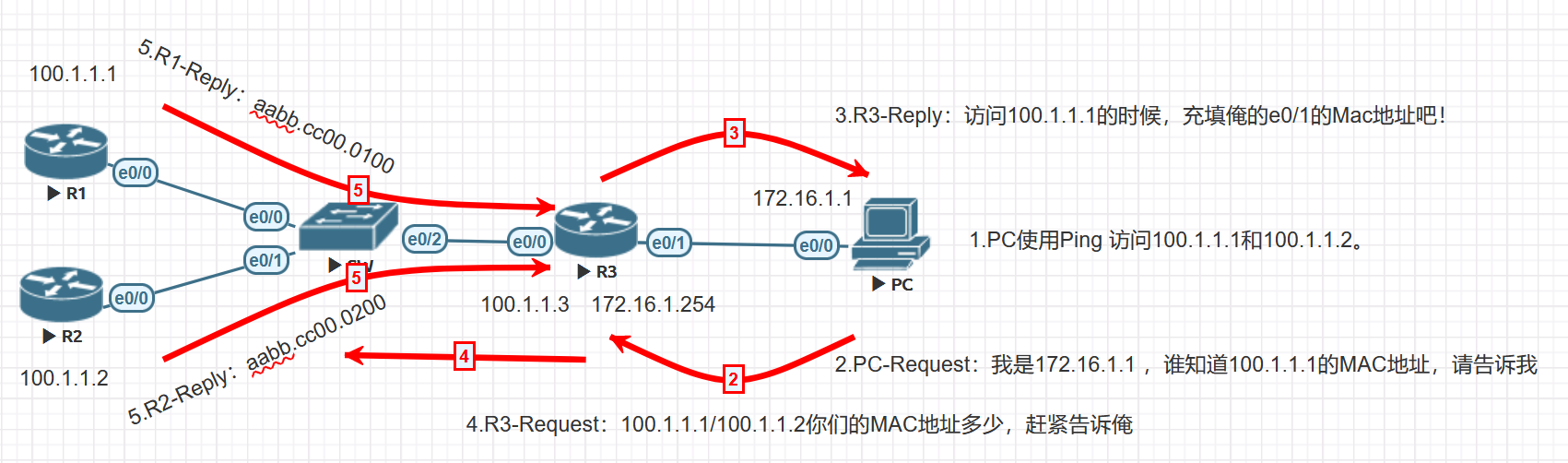
Configure the PC to use R3 as its default gateway. The PC resolves R3’s address and sends the frame to R3. R3 looks up the route and resolves the destination on its outgoing link if needed.

Packet 7 is a gratuitous ARP Reply. Packet 8 asks for the MAC of gateway 172.16.1.254, and packet 9 is the gateway’s reply.


This flow uses ordinary next-hop resolution. The PC only needs a dynamic entry for the gateway when sending to these remote destinations. Local destinations still use direct ARP.

Without Proxy ARP or a default gateway
Disable Proxy ARP on R3’s Ethernet0/1.
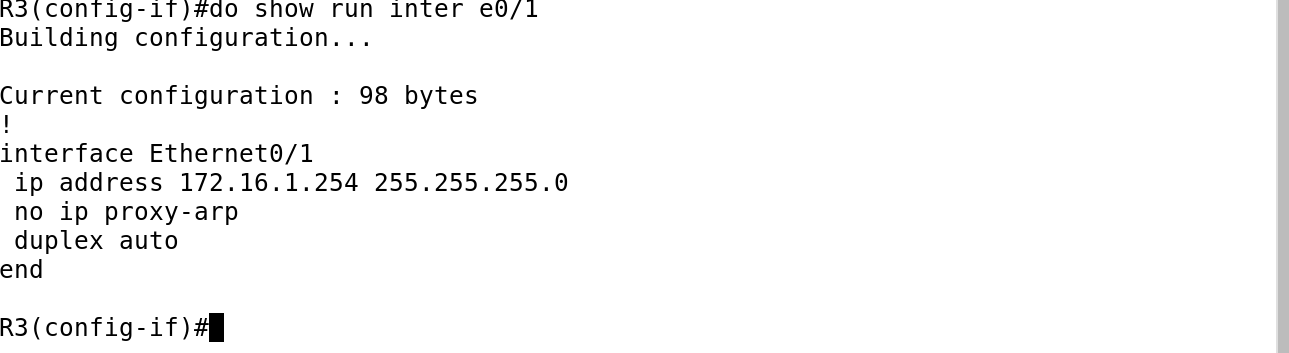
Remove the PC’s default gateway.
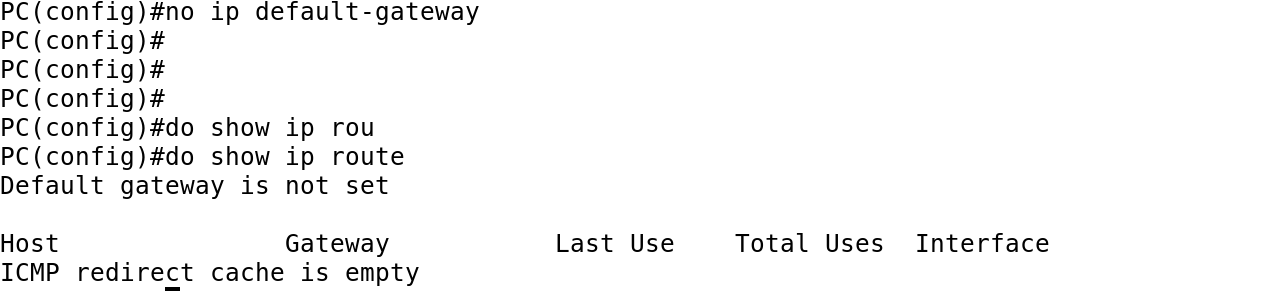
Repeat the pings.
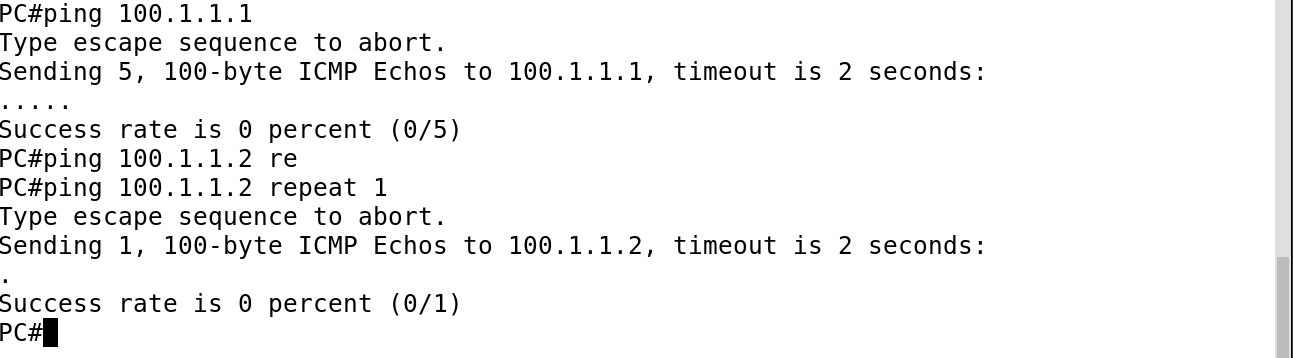

The simulated PC still asks for the remote IPs. R3 no longer replies on their behalf, and the destinations are on a different link. Without a reply, the pings fail.
Gratuitous ARP
Gratuitous ARP (GARP) announces a device’s own IP-to-MAC mapping. Neighbors may use it to refresh their caches. A device can use a Request or a Reply, depending on its implementation.
Configure the same IP on R1 and R2 in the isolated lab.

Both devices announce the address, and R2 reports a duplicate.
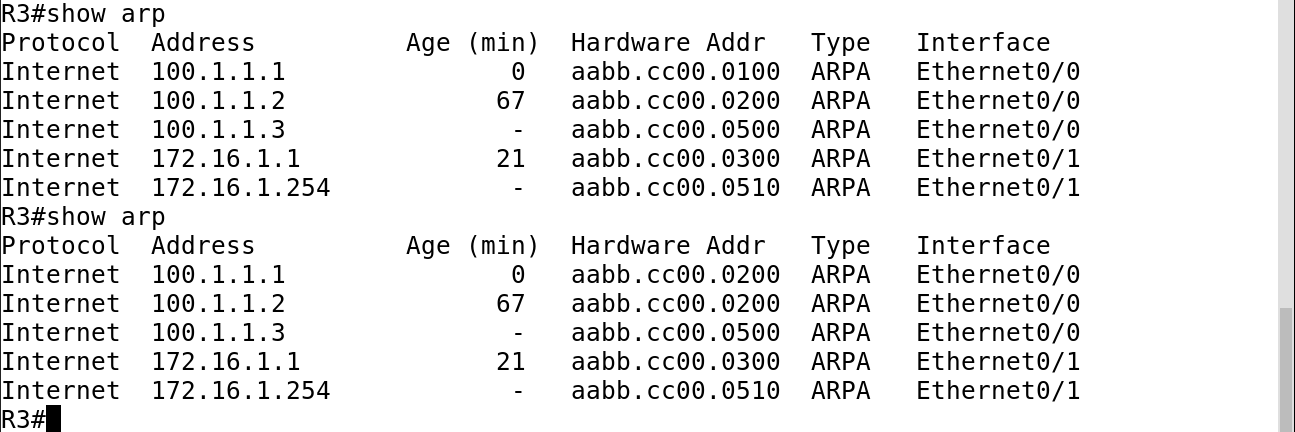
The MAC for 100.1.1.1 changes in R3’s ARP table.
The following logs record the conflict.

An ARP Probe checks a candidate address before use. It is a broadcast Request with sender IP 0.0.0.0 and the candidate as target IP. A standard ARP Announcement is also a broadcast Request, with the announced address in both IP fields. RFC 5227
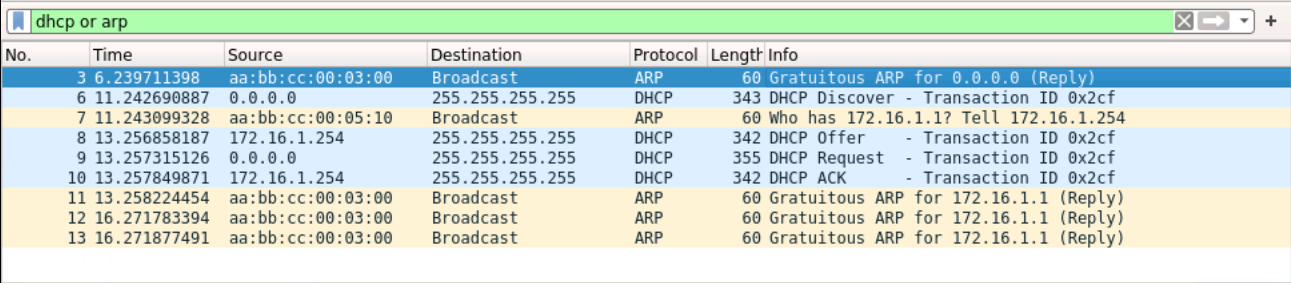
In the saved DHCP capture, packet 3 is a Reply with opcode 2.
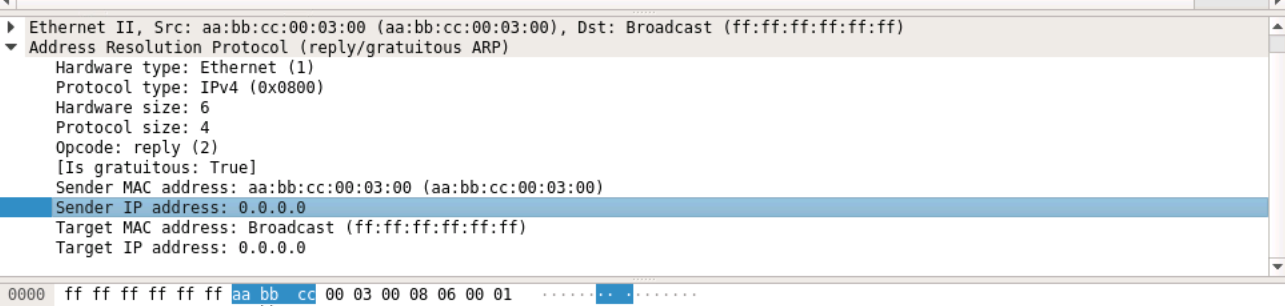
Both IP fields are 0.0.0.0, so this is not a standard Probe. Packets 11–13 show gratuitous Replies for 172.16.1.1.
Reverse ARP
RARP lets a device ask a server for its own protocol address based on its hardware address. Early diskless workstations used it to learn their IPv4 address. The server needs a preconfigured mapping. RFC 903
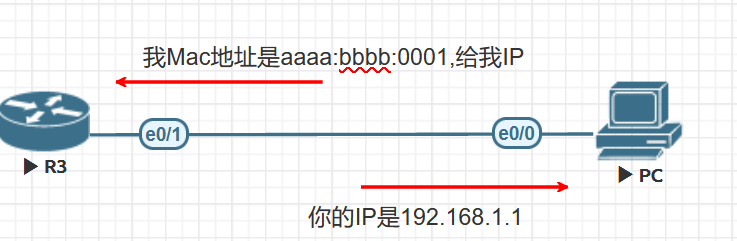
RARP provides little boot information and normally needs a server on the local network. BOOTP can supply more settings and use a relay. RFC 1542
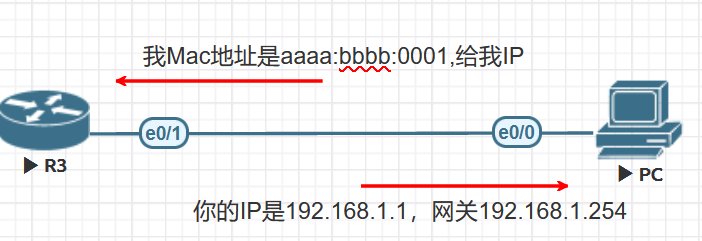
Traditional BOOTP deployments usually use preconfigured mappings. DHCP builds on the BOOTP message format and adds leases and dynamic allocation. RFC 2131
Inverse ARP
Inverse ARP learns the protocol address of the remote endpoint when the link identifier is already known. In Frame Relay, the DLCI identifies the virtual circuit, and InARP can learn the peer’s IP. RFC 2390
ARP security
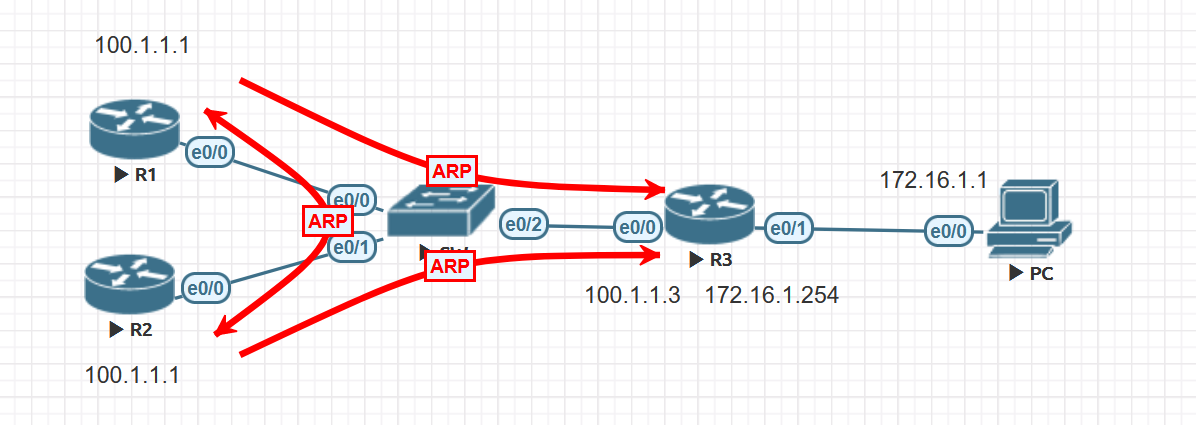
Basic ARP has no built-in way to authenticate an IP-to-MAC mapping. A forged mapping can direct frames to the wrong device.
ARP spoofing
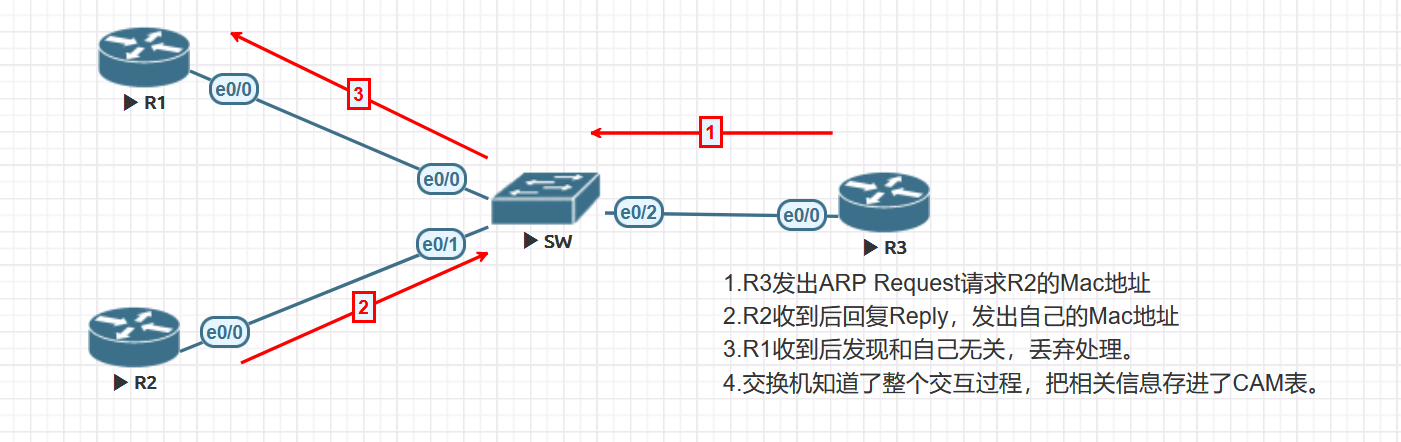
The first diagram shows the normal exchange.
In the test, R1 sends a forged reply.
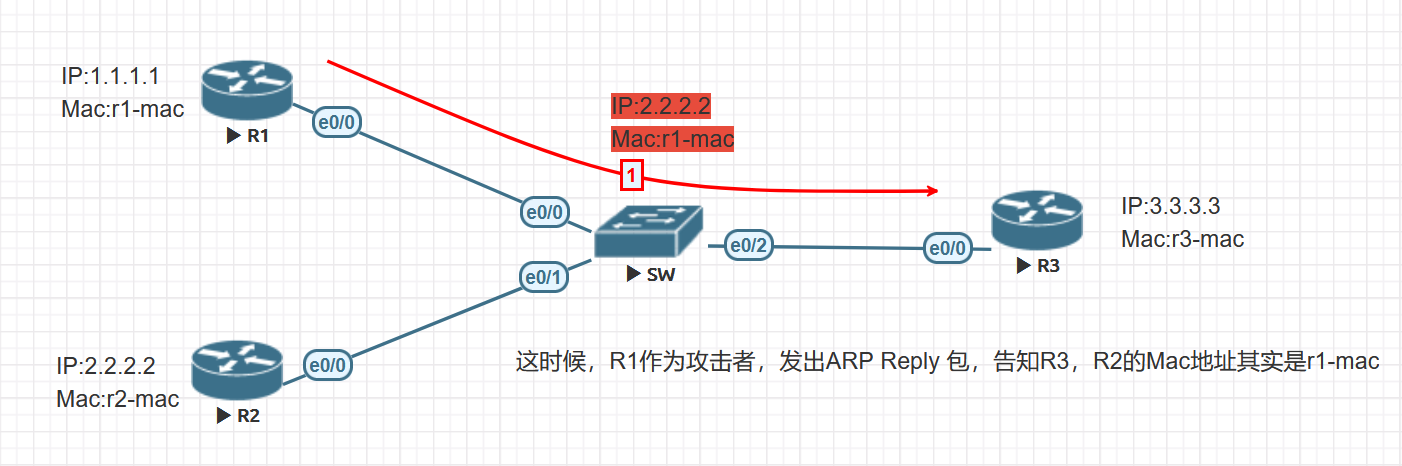
If R3 accepts it, R3 may associate R2’s IP with R1’s MAC. Whether it replaces an entry depends on the receiving implementation and security policy.
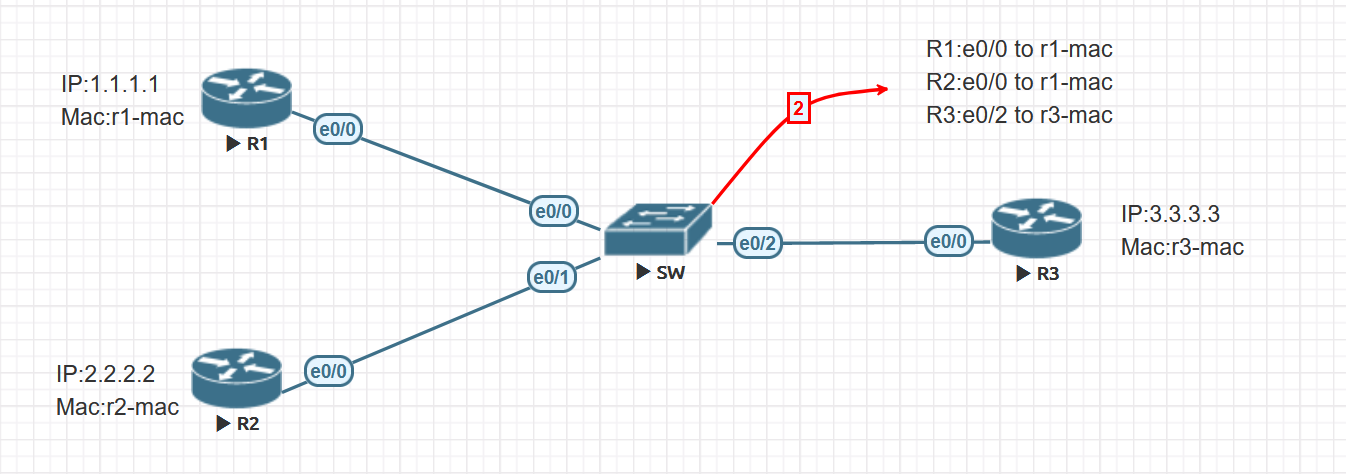
The switch learns Ethernet source MAC addresses and ingress ports. Its entry for R1’s MAC can be correct while R3’s ARP entry for R2 is wrong.
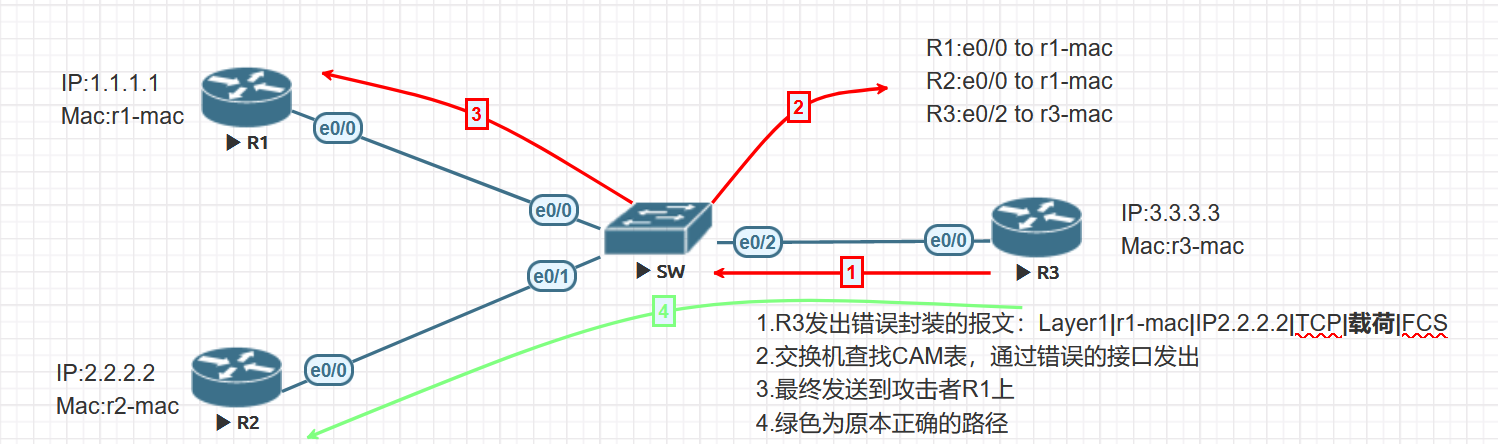
The IP destination remains R2, but the Ethernet destination is now R1’s MAC. If R1 forwards the traffic, it can intercept it. If it drops the frames, communication fails.
ARP flooding
A flood can consume packet-processing capacity and neighbor-table resources. A switch’s CAM table learns Ethernet source MAC addresses. CAM pressure requires the switch to learn many distinct MACs, which is separate from the ARP packet rate.
Defenses against ARP spoofing
1. Dynamic ARP Inspection (DAI)
On supported Cisco Catalyst switches, DAI checks ARP received on untrusted ports. DHCP snooping bindings can validate dynamic clients, and ARP ACLs can cover static addresses. Verify the expected bindings before enabling inspection.
The example uses DHCP in VLAN 10 and receives server messages on Ethernet0/0.
Switch(config)#ip dhcp snooping
Switch(config)#ip dhcp snooping vlan 10
Switch(config)#interface Ethernet0/0
Switch(config-if)#ip dhcp snooping trust
Check show ip dhcp snooping binding, then enable inspection for VLAN 10. An interface set to DAI trust bypasses inspection for incoming ARP. Set trust according to the topology and where inspection occurs. Use the inspection interface and statistics commands to check the result. Cisco DAI guide
2. Periodic gratuitous ARP from the gateway
Some Huawei devices can send GARP periodically to refresh the gateway mapping. This can help restore the correct entry, but it cannot stop a host from accepting a later forged update. Huawei gateway ARP troubleshooting
[Quidway] arp gratuitous-arp send enable
[Quidway] arp gratuitous-arp send interval 100
Check the supported interval and configuration mode for the target VRP release. The GARP drop command discussed below applies to received packets.
Defenses against ARP flooding
1. Rate-limit ARP packets
These Huawei examples are from an older lab. Check the supported scope, time window, and action when the limit is exceeded. Cisco DAI also has a rate limit, and some Catalyst platforms put the port into err-disabled state after a violation. Cisco DAI guide
Global example:
[Quidway] arp anti-attack rate-limit enable
[Quidway] arp anti-attack rate-limit 200
VLAN 100 example:
[Quidway] vlan 100
[Quidway-vlan100] arp anti-attack rate-limit enable
[Quidway-vlan100] arp anti-attack rate-limit 200
The GE1/0/1 example uses a 10-second window, a threshold of 200 packets, and a 60-second blocking timer.
[Quidway] interface gigabitethernet1/0/1
[Quidway-GigabitEthernet1/0/1] arp anti-attack rate-limit enable
[Quidway-GigabitEthernet1/0/1] arp anti-attack rate-limit 200 10 block timer 60
2. Rate-limit ARP misses
An IP packet can have a route but no usable next-hop ARP entry. That miss can trigger resolution work in the control plane and an ARP Request on the outgoing link. A large number of misses can create load even when the incoming traffic is IP rather than ARP.
Global example:
[Quidway] arp-miss anti-attack rate-limit enable
[Quidway] arp-miss anti-attack rate-limit 200
VLAN 100 example:
[Quidway] vlan 100
[Quidway-vlan100] arp-miss anti-attack rate-limit enable
[Quidway-vlan100] arp-miss anti-attack rate-limit 200
The interface example allows up to 200 ARP Miss events in 10 seconds on GE1/0/1.
[Quidway] interface gigabitethernet1/0/1
[Quidway-GigabitEthernet1/0/1] arp-miss anti-attack rate-limit enable
[Quidway-GigabitEthernet1/0/1] arp-miss anti-attack rate-limit 200 10
3. Drop received gratuitous ARP
Some Huawei platforms can drop received GARP. Check the scope and whether services depend on GARP for address changes before enabling it.
[Quidway] arp anti-attack gratuitous-arp drop
The next example applies the setting under VLANIF10.
[Quidway] interface vlanif 10
[Quidway-Vlanif10] arp anti-attack gratuitous-arp drop
On Cisco IOS, check the platform command reference for ip arp gratuitous. The local option limits acceptance to local-subnet GARP, and ignore stops local processing of received GARP. This setting governs the device’s own ARP processing. Cisco IOS command reference
